How to Set Up IPTV on Samsung & LG Smart TVs (2026)
Updated July 14, 2026 · 11 min read · Expanded with 2026 app activation models — July 2026
Install a native IPTV player — IBO Player Pro, SmartOne IPTV, Smart IPTV, or Flix IPTV — from Samsung Apps or the LG Content Store, note the MAC address the app displays, then upload your M3U or Xtream Codes playlist on that app's activation portal. All four apps offer a free trial (7–15 days) before their small one-time activation fee.
Samsung (Tizen) and LG (webOS) smart TVs can run IPTV straight from the TV's own app store — no Firestick, no Android box, no extra remote. But smart-TV IPTV apps work on a fundamentally different model from the apps you may know on Fire TV or Android: most of them tie your playlist to the TV's MAC address, have you upload your login on a companion website from your phone or computer, and charge a small one-time activation fee after a free trial. If you've never seen that flow before, it feels strange the first time — and it's the single biggest source of confusion we see from smart-TV owners.
This guide covers the four native players that reliably work on both platforms in mid-2026 — IBO Player Pro, SmartOne IPTV, Smart IPTV (SIPTV), and Flix IPTV — with their current activation fees and trial windows, the exact install paths in the Samsung and LG stores, the MAC-plus-portal playlist flow step by step, and what to do when an app disappears from your regional store. One thing up front, because it matters: those activation fees go to the app developers, not to StreamVega. Your subscription never includes or requires them, every app here lets you test free first, and a free StreamVega trial means you can prove the whole chain works before paying anyone a cent.
How smart-TV IPTV apps actually work: MAC + portal, not logins
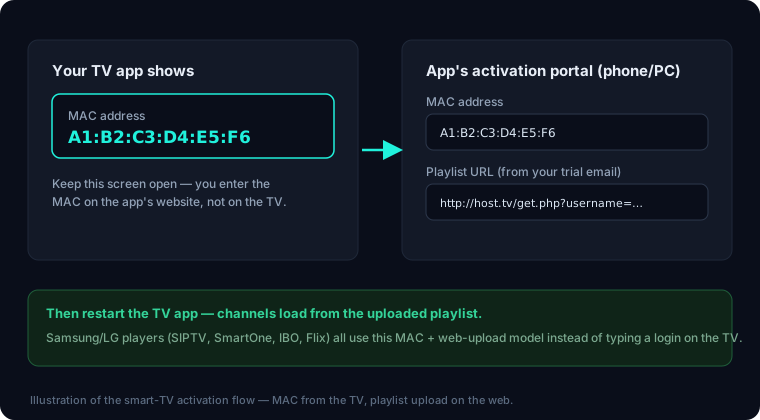
On a Firestick or Android box, IPTV setup is what you'd expect from any app: open it, pick 'Xtream Codes' or 'M3U', type your server URL, username, and password with the remote, done. The login lives inside the app on the device. Smart-TV apps on Tizen and webOS almost never work that way. Instead, the app identifies your television by its MAC address — a unique hardware ID, usually shown in the format aa:bb:cc:dd:ee:ff on the app's first screen — and you attach your playlist to that MAC on the developer's website, from any phone or computer. The TV app then simply pulls down whatever playlist is registered against its MAC.
Why the difference? Typing long URLs with a TV remote is miserable, Tizen and webOS make on-device text entry and file handling harder for developers than Android does, and a web portal lets the developer manage licensing per television. The practical upside is real: you do all the typing on a proper keyboard, you can swap or update your playlist from your couch or your office without touching the TV, and if you mistype something you fix it on the website rather than re-entering everything on-screen. The downside is that your playlist briefly passes through the app developer's server during upload — which is why you should only ever use the official portal URL shown inside the app itself.
The second half of the model is the activation fee. These apps are built by small independent developers who don't sell subscriptions or content — the app is an empty player until you add a playlist — so they fund development with a one-time (occasionally yearly) license per TV, typically €5–13. Every app in this guide gives you a free trial first, ranging from 7 to 15 days, so you activate only after you've confirmed your channels, guide, and picture all work on your specific TV. To be completely clear: this fee is the app developer's charge for their player software. It is not a StreamVega charge, it isn't part of your subscription, and no IPTV provider can waive or collect it.
The 2026 app lineup: fees, trials, and official portals
All four apps below are in both the Samsung and LG stores as of July 2026, all use the MAC + portal model (IBO also supports adding playlists directly in-app), and all are players only — none of them include channels. Prices are what the developers' official portals list today; the app's own activation screen is always the final word.
- ✓**IBO Player Pro** — the most polished of the group and currently the most practical native choice on both platforms. 7-day free trial, then a license of roughly €5/year or €10 lifetime, payable in-app or via the portal shown on its start screen (iboproapp.com). Uniquely, it pairs your MAC with a device key — you need both to manage playlists on its website — and it also lets you add an Xtream Codes login directly in the app.
- ✓**SmartOne IPTV** — clean interface, strong multi-TV management from one portal account. The official portal (smartone-iptv.com) gives you 15 days to test, then €12.99 for a lifetime license or €2.50/year per TV. Playlists are uploaded per-MAC on the portal's 'Upload Playlist' page.
- ✓**Smart IPTV (SIPTV)** — the long-standing veteran, dating back to the earliest Tizen/webOS IPTV days. 7-day free trial, then a one-time €5.49 per TV, permanently bound to that TV's MAC (siptv.app/activation). Playlists upload at siptv.app/mylist. Spartan interface, but famously stable — and the cheapest lifetime license here.
- ✓**Flix IPTV** — a solid fourth option if a regional store is missing one of the above. 7-day free trial, then a one-time €8.99 per device, with playlist upload at flixapp.net/mylist against your MAC.
- ✓Beware lookalike sites: the IBO family in particular has spawned dozens of unofficial 'activation' storefronts reselling licenses at marked-up prices. Only pay at the exact URL the app displays on your TV screen.
Install on a Samsung TV (Tizen), step by step
- 1Press the Home button on your Samsung remote, scroll left in the home rail, and select **Apps** (on 2023+ Tizen it sits in the left-hand menu; on older sets it's a row icon on the home bar).
- 2Select the **search (magnifying glass)** icon in the top-right of the Apps screen and type the player name — 'IBO Player Pro', 'SmartOne IPTV', 'Smart IPTV', or 'Flix IPTV'.
- 3Select the app from the results and press **Install**. Newer Samsung TVs require a free Samsung account to install apps — if prompted, sign in or create one on-screen (or via the SmartThings phone app, which is faster to type on).
- 4When the install finishes, choose **Open**. The app's first screen will display your TV's **MAC address** (and, for IBO Player Pro, a **device key**) plus the developer's portal URL — photograph this screen with your phone.
- 5Optionally press-and-hold the app icon and choose **Add to Home** so it lives on your home rail next to Netflix and YouTube.
- 6Leave the app open on the MAC screen and jump to the playlist-upload section below — the upload happens on your phone or computer, not on the TV.
Install on an LG TV (webOS), step by step
- 1Press the Home button on the LG Magic Remote and open the **LG Content Store** — on webOS 22 and newer it's simply labelled **Apps** in the home ribbon.
- 2Select the **search** icon at the top of the store and type the player name — 'IBO Player Pro', 'SmartOne IPTV', 'Smart IPTV', or 'Flix IPTV'.
- 3Open the listing and press **Install**. Sign in or create a free LG account if the store asks (newer webOS versions require one for installs).
- 4Launch the app. As on Samsung, the first screen shows your TV's **MAC address** — plus a device key on IBO Player Pro — and the official portal URL. Photograph it.
- 5If you can't find the app, check the store's region: LG ties the Content Store catalog to the service country in Settings → General → Location. An app missing in one country's store is sometimes present in another's, but changing service country can affect other apps, so treat that as a last resort and read the regional-store section below first.
- 6Leave the MAC screen up and move to the playlist upload — the next section is identical for Samsung and LG.
Add your playlist: the MAC + portal upload flow
This is the step that replaces 'typing your login into the app'. You'll do it once per TV, from any phone, tablet, or computer, and it takes about three minutes with your StreamVega welcome email open.
- 1On your phone or computer, browse to the **exact portal URL shown on your TV screen** — for example siptv.app/mylist for Smart IPTV, flixapp.net/mylist for Flix, smartone-iptv.com for SmartOne, or the manage-playlists page at iboproapp.com for IBO Player Pro (which asks for the device key too).
- 2Enter the **MAC address** exactly as the TV displays it, colons included.
- 3Add your playlist. Choose **Xtream Codes API** if the portal offers it and enter the server URL, username, and password from your StreamVega email; otherwise paste your single **M3U URL**. Xtream Codes is the better option where available — it loads faster and brings the program guide (EPG) along automatically.
- 4Save/upload, then go back to the TV and **restart the app** (some apps have a 'reload' or you can just close and reopen it). Your channels, movies, and series populate within a minute.
- 5If nothing loads, re-check the MAC for typos first — one wrong character registers the playlist to a TV that doesn't exist. Then test that your line itself is active and confirm the M3U or Xtream details were pasted whole, with no trailing spaces.
Use the trial window before paying any activation fee
Every app in this guide is fully functional during its trial — 7 days for IBO Player Pro, Smart IPTV, and Flix IPTV, and 15 days for SmartOne. Use that window properly: watch during weekday evenings when both your ISP and IPTV traffic peak, open the program guide and confirm times line up with your time zone, try a 4K channel if your plan includes them, and jump into the movies/series section to check on-demand playback. The trial is testing three things at once — the app, your TV's decoder, and your connection — and it costs nothing.
Sequence it with your subscription trial too. A free StreamVega trial delivers your M3U and Xtream Codes login by email in minutes with no card, so you can run the app's trial and the service trial together and only spend money — on either — once you've seen everything work on your actual television. If channels misbehave during the trial, don't assume the app is at fault: run a quick line check and message support with your account email; a login re-issue takes minutes. And remember the honest framing: when you do activate, that €5.49–€12.99 goes to the app's developer for their software license. StreamVega doesn't charge it, doesn't receive it, and your subscription price is unaffected either way.
App missing from your regional store — or TV too old?
Smart-TV IPTV players do occasionally vanish from stores. 2026 has been an active year for this: IPTV Smarters Pro was pulled from the LG Content Store and blocked on Samsung Tizen in several regions, and a wave of rights-holder takedowns around the T20 World Cup removed dozens of IPTV apps from mobile stores. Store removals are usually regional and legal-pressure-driven, not a sign the app is malware — but they're exactly why this guide centers on four apps rather than one.
If an app you already installed disappears from the store, it generally keeps working on your TV — removal blocks new installs, not existing ones (server-side blocks like Smarters on Tizen are the rarer, harsher case). If you can't install your first choice at all, simply pick another from the lineup above: your StreamVega playlist works identically in all of them, and moving it is free — just register the same M3U or Xtream login against the new app's portal. The only thing that doesn't transfer is a paid activation fee, which is per-app — one more reason to burn the free trial before paying.
Finally, age limits are real: Samsung TVs from before roughly 2016 (Orsay era and the earliest Tizen sets) and LG TVs on Netcast or early webOS often can't install any current player, and developers have been dropping legacy-OS support each year. If your TV is in that bracket — or the store simply won't offer any of these apps — the clean fix is a low-cost Firestick or Android box on an HDMI port, which runs every modern player, updates for years, and moves with you to your next TV. Our Firestick guide covers that setup end to end.
Key takeaways
- →Samsung and LG TVs run IPTV natively — no Firestick or box needed — but the apps use a MAC-address + web-portal model, not the in-app logins you may know from Fire TV.
- →The four reliable native players in 2026: IBO Player Pro (7-day trial, ~€10 lifetime), SmartOne IPTV (15-day test, €12.99 lifetime or €2.50/yr), Smart IPTV (7-day trial, €5.49 one-time), Flix IPTV (7-day trial, €8.99 one-time).
- →Activation fees are charged by the app developers, not StreamVega — your subscription never includes or requires them, and you can test everything free before paying anyone.
- →You add your playlist on the app's own website (siptv.app/mylist, flixapp.net/mylist, etc.) using the MAC shown on the TV screen — always use the exact URL the app displays, because clone sites exist.
- →If an app vanishes from your regional store (it happened to IPTV Smarters Pro on LG in 2026), your playlist moves to another player for free — only the per-app activation fee doesn't transfer.
FAQ
- Can I watch IPTV on a Samsung or LG TV without a Firestick or box?
- Yes. Both platforms run native IPTV players — IBO Player Pro, SmartOne IPTV, Smart IPTV (SIPTV), and Flix IPTV — installed straight from Samsung Apps or the LG Content Store. Install one, note the MAC address it shows, upload your playlist on the app's portal, and you're watching with no extra hardware.
- Why does the TV app ask for a MAC address instead of a username and password?
- Smart-TV players identify your television by its hardware MAC address and have you attach your M3U or Xtream Codes playlist to that MAC on their website, from a phone or computer. It replaces painful remote-control typing and is a one-time step — the app then loads whatever playlist is registered to your TV.
- Are the app activation fees part of my StreamVega subscription?
- No. Activation fees (Smart IPTV €5.49 one-time, Flix €8.99, IBO Player Pro ~€10 lifetime, SmartOne €12.99 lifetime or €2.50/year) are charged by the independent app developers for their player software. StreamVega doesn't charge, collect, or require them — and every app has a free trial so you can test before paying.
- Which IPTV app is best for Samsung and LG TVs in 2026?
- IBO Player Pro is the most polished and the most practical first choice on both platforms. Smart IPTV is the cheapest lifetime license (€5.49) and famously stable; SmartOne offers the longest test window (15 days) and easy multi-TV management; Flix IPTV is a solid fallback. All accept the same M3U or Xtream Codes login.
- The app I want isn't in my country's app store — what now?
- Store removals are usually regional. Install one of the other three players instead — your playlist works identically in all of them and moving it costs nothing; only per-app activation fees don't transfer. Already-installed apps usually keep working after a store removal. If no player installs at all, a cheap Firestick or Android box solves it permanently.
- Do I pay the activation fee again if I change IPTV providers or switch apps?
- Changing providers: no — the license is bound to your TV's MAC, and you can swap the playlist on the portal anytime for free. Switching to a different player app: yes, each app licenses separately, which is why you should use the free trial to settle on one app before activating it.
Related guides
Try it yourself — free for 24 hours
No credit card. We send your login by email or WhatsApp, usually within minutes.
- No credit card
- Login in minutes
- Cancel anytime