How to Set Up IPTV Smarters Pro in 2026 (Xtream Codes, M3U & the Settings That Matter)
Updated July 14, 2026 · 12 min read · Expanded with install-source warnings and full settings — July 2026
Download IPTV Smarters Pro from the official iptvsmarters.com site (it was removed from Google Play by a court order — avoid store clones), open "Login with Xtream Codes API", and enter any name plus the username, password, and server URL from your provider. Channels, movies, series, and the TV guide load automatically in about a minute.
IPTV Smarters Pro is still the most widely used IPTV player in 2026 for one reason: it runs on almost everything — Firestick, Android phones and boxes, iPhone, iPad, Apple TV, Windows, and Mac — and the same login works identically on all of them. It supports both the Xtream Codes API and plain M3U playlists, handles live TV, movies, series, catch-up, and a full program guide, and it's free.
But setting it up in 2026 is different from the guides written a few years ago, because the app is no longer where most people expect it to be. It was removed from Google Play by a court order, and the gap has been filled by lookalike apps that are not made by the real developer — some of them exist purely to collect the IPTV logins people type into them. This guide covers where to actually get the app on every platform, the full login walkthrough, EPG setup, the handful of settings worth changing, and how to update it safely. If you're comparing players first, see TiviMate vs IPTV Smarters Pro.
Where to download IPTV Smarters Pro in 2026 (and the clone-app trap)
In December 2022, a Spanish court sided with LaLiga — Spain's top football league — and ordered Google to remove IPTV Smarters Pro from the Google Play Store worldwide. The app itself is just a player (it ships with no channels), but the ruling stood, and the Pro app has never returned to Google Play. That single removal is the root of most bad setups today, because when an app disappears from the official store, imitations rush in to take its place.
Search "IPTV Smarters" on Google Play or Apple's App Store right now and you'll find a pile of apps with nearly identical names and logos — "IPTV Smarters Player Lite Pro", "Smarters IPTV Player", "IPTV Smarters Player Pro Lite" and more — published by developers who have nothing to do with WHMCS Smarters, the real company behind the app. This matters more than a normal knock-off problem: the first thing you do in an IPTV player is type in your server URL, username, and password. A malicious clone can silently forward those credentials to its operator, who can then use — or resell — your subscription. If your service suddenly reports too many connections or your login stops working days after you set up a new device, a harvested login is a real possibility.
The rule is simple: get the app from the developer's own website, iptvsmarters.com, or — on Apple devices — from the one App Store listing actually published by the real developer. Before installing anything from a store, open the listing and read the developer name, not the app name. If it isn't the official developer, skip it, no matter how many downloads it shows.
- ✓Android phones, tablets, boxes, and Firestick: download the APK from the official IPTV Smarters website (iptvsmarters.com). There is no legitimate Google Play listing for the Pro app.
- ✓iPhone, iPad, and Apple TV: install "Smarters Player Lite" from the App Store — check that the developer shown on the listing is WHMCS Smarters before you tap Get.
- ✓Windows and Mac: the official site distributes desktop installers (an .exe for Windows 10/11 and a .dmg for macOS). Treat Microsoft Store listings with the Smarters name the same way as Google Play results — verify the publisher first.
- ✓Never install an APK from a link in a Telegram group, a YouTube description, a popup inside another app, or a reseller's file share. Even when well-intentioned, those files are often outdated or repackaged.
Install it on your device (Firestick, Android, Apple, desktop)
On a Firestick or Fire TV, the app isn't in the Amazon Appstore either, so you sideload it with the free Downloader app — a normal, Amazon-permitted process that takes about five minutes. On an Android phone or box you can skip Downloader and just use the built-in browser. On Apple and desktop platforms it's an ordinary store or installer download.
- 1Firestick / Fire TV: from the home screen, search for and install the free "Downloader" app from the Amazon Appstore.
- 2Open Settings → My Fire TV → Developer Options and enable "Install unknown apps" for Downloader. On newer Fire OS versions you'll instead be prompted to allow it the first time Downloader tries to install something.
- 3Open Downloader, select the URL field, and type the Android download address from the official IPTV Smarters website. When the APK finishes downloading, choose Install, then Done, and let Downloader delete the APK file to free space.
- 4Android phone, tablet, or box: open the site in your browser, download the Android APK, and open it from your notifications. Android will ask you to allow installs from your browser — allow it once, install, and you can turn the permission back off afterwards.
- 5iPhone, iPad, Apple TV: open the App Store, search "Smarters Player Lite", confirm the developer is WHMCS Smarters, and install like any other app. The Lite app is the same core player with the same Xtream Codes and M3U login flow.
- 6Windows or Mac: download the desktop installer from the official site and run it. The desktop app mirrors the TV layout, so everything in the rest of this guide applies there too.
Log in with Xtream Codes API (recommended)
On first launch the app shows a terms-of-use screen — accept it and you land on the login options. "Login with Xtream Codes API" is the one you want if your provider gave you a username, password, and server URL (StreamVega does — the three lines are in your welcome email, and you can start a free trial to get a set in minutes). Xtream Codes login is better than M3U in this app for a practical reason: it pulls live TV, movies, series, categories, and the program guide as separate, organised sections automatically, and it keeps them updated without you touching a playlist file. The full comparison is in our M3U vs Xtream Codes guide.
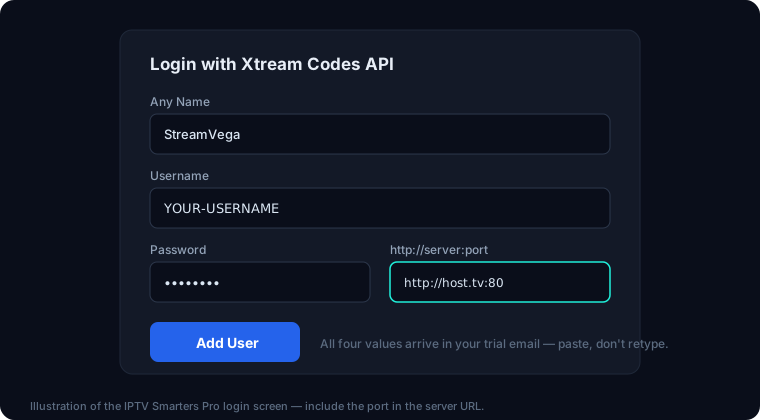
- 1Open IPTV Smarters and choose "Add New User" (first run goes straight to this), then "Login with Xtream Codes API".
- 2Any Name: type whatever you want this playlist called — "StreamVega" works. It's only a label.
- 3Username and Password: copy these exactly from your provider email. They are case-sensitive, and the number-one login failure is a retyped letter — copy-paste when the device allows it.
- 4Server URL: enter the full address including the protocol and port, e.g. http://example-server.tv:8080 — no trailing slash, no spaces before or after. If your provider's URL starts with https://, keep it; don't change one to the other.
- 5Tap "Add User". The app validates the login, then imports Live TV, Movies, and Series — the first import can take a minute or two on a big channel list, so let it finish.
- 6You land on the main dashboard with Live TV, Movies, Series, and (if your provider supports it) Catch Up tiles. Open Live TV and play any channel to confirm the stream itself works.
The M3U alternative, and adding more than one user
If all you have is an M3U link, the app handles that too: on the login options screen choose "Load Your Playlist or File/URL", select "M3U URL", give it a name, paste the full link, and save. You get the same player, but the app treats the playlist as one flat list — categories and the TV guide depend on what's embedded in the file, and when a provider updates their lineup you sometimes need to re-add the URL. If your provider offers both formats, pick Xtream Codes.
Smarters also supports multiple users on one device, which is genuinely useful for households. From the dashboard, open the profile/user icon (List Users) and choose "Add User" to log in a second subscription or a second M3U playlist — each user keeps its own favourites, recently watched, and EPG. Switching takes two clicks from the user list. Note that multiple users on one login don't add simultaneous streams: how many screens can play at once is set by your subscription's connection count, not by the app.
Set up the EPG (TV guide) and keep it fresh
With an Xtream Codes login, the program guide usually configures itself — the app fetches the guide data your provider publishes, and channel-by-channel listings appear in the Live TV view and the dedicated EPG screen. The catch is timing: on a fresh install the first EPG download happens after the channel import, so an empty guide in the first few minutes is normal. Give it five minutes, or force it.
To force a refresh, open Settings → EPG (on some versions it's under General Settings, or a "Refresh EPG" option behind the three-dot menu on the home screen) and choose the update/refresh option. Re-logging into the user does the same thing. If listings show but at the wrong times, the fix is the EPG time shift: in the EPG settings, adjust "Time Shift" in one-hour steps until the current program lines up with what's actually on — this is a timezone mismatch between the guide feed and your device, not a broken guide.
Two settings keep the guide healthy long-term: leave EPG auto-refresh enabled with a daily interval, and if your version offers "update on app start", turn it on. If the guide is still empty after a forced refresh and a restart, the guide feed itself may be the issue — check whether other channels populate, and see our IPTV Smarters troubleshooting guide for the full EPG diagnosis path.
The settings actually worth changing
Smarters works fine on defaults, but five settings separate an okay setup from a great one. All of them live under Settings (the gear icon on the dashboard).
- ✓Player engine — Settings → Player Selection / Player Settings. The built-in options are the Native player and ExoPlayer, and you can add external players like VLC. If a stream stutters, shows a black screen with audio, or won't play at all, switching engine fixes it more often than anything else: ExoPlayer is fast and efficient but fussy with some codecs; VLC plays almost anything at a small performance cost. Change it for the stream type that's failing (live/VOD/series can be set separately).
- ✓Buffer — in the player settings, raise the buffer if your picture pauses to load every few minutes. Around 2–5 seconds suits most connections; go higher (5–10 seconds) on weak Wi-Fi. A bigger buffer trades a slightly slower channel change for smoother playback. If buffering persists across all channels, test your connection and check our server status page before blaming the app.
- ✓Hardware decoding — leave it on for modern devices; if an older box shows artefacts or crashes on certain channels, switching that stream type to software decoding (or the VLC engine) is the workaround.
- ✓Time format — Settings → General Settings lets you switch between 12-hour and 24-hour clocks. Set it to match how you read the EPG; a mismatched format makes guide times feel "wrong" even when they're correct.
- ✓Parental control — Settings → Parental Control sets a PIN and lets you lock specific categories (and mask adult categories entirely). Do this before handing the remote to kids: the lock applies to browsing as well as playback, and the PIN is also required to change the setting itself.
- ✓Automation niceties — options like "auto-start on boot" (on boxes that allow it) and remembering the last channel make the app behave like a cable box. Worth enabling on a dedicated TV device, worth skipping on a shared tablet.
Catch-up and multi-screen
Catch-up (the app also calls it TV Archive) lets you replay programs from the last few hours or days on channels where your provider records an archive. In Smarters, catch-up channels are grouped under the Catch Up tile on the dashboard — open it, pick a channel, and you'll see a date/time grid of past programs pulled from the EPG. Two things must be true for it to work: your subscription includes catch-up on that channel, and the EPG is populated (the archive is indexed against guide data, so a broken EPG also breaks catch-up).
Multi-screen is the dashboard tile that splits the display into up to four panes, each playing a different live channel — genuinely fun for sports weekends. Pick a layout, then use the + control in each pane to assign a channel from your list. The practical limit isn't the app, it's your plan: every extra pane consumes one simultaneous connection, so a single-connection subscription can only fill one pane. If a second pane errors while the first plays fine, that's the connection cap, not a bug — you can confirm how many connections your account allows on our subscription checker.
Updating the app safely
How updates arrive depends on how you installed. App Store and desktop installs update the normal way — automatically or with a one-click store update. Sideloaded installs on Firestick and Android boxes never update themselves: the app happily runs an old version forever, until a provider-side change or an OS update breaks something. Check every couple of months, and update by repeating the original install — download the current APK from the official IPTV Smarters site (on Firestick, via Downloader again) and install it straight over the existing app. Your users, logins, favourites, and settings survive an install-over-the-top; you do not need to uninstall first.
Just as important is what not to do. Ignore any "update available" message that appears inside a stream or as a popup from another app — legitimate updates never arrive that way, and fake update prompts are a common trick for pushing clone APKs. The same goes for update links posted in chat groups. If the app misbehaves after an update — logins rejected, sections missing, endless loading — work through our fix-it guide in order, and verify your account is active on the checker before reinstalling anything.
One last placement note: this guide pairs with our IPTV Smarters Pro player page, which tracks which StreamVega-supported devices run it best. If you set it up and decide you want deeper guide features or recordings instead, the TiviMate comparison is the natural next read — your same login works in both.
Key takeaways
- →IPTV Smarters Pro is not on Google Play — a Spanish court order won by LaLiga forced its removal in December 2022. Apps with the same name still on Google Play or the App Store are third-party clones; some harvest the login you type in.
- →The safe install path is the official iptvsmarters.com download for Android and Firestick, the WHMCS Smarters "Smarters Player Lite" listing on Apple's App Store for iPhone/iPad/Apple TV, and the official desktop installers for Windows and Mac.
- →Use "Login with Xtream Codes API" rather than an M3U URL when you can — it loads categories, VOD, and the program guide automatically and is easier to fix when something breaks.
- →Two settings solve most playback complaints: switch the player engine (Native/ExoPlayer vs VLC) for streams that stutter or show black screens, and raise the buffer to 3–5 seconds on unstable Wi-Fi.
- →Sideloaded copies never auto-update. Update by re-downloading from the official site — never from an "update available" popup inside a stream or a link someone sends you.
FAQ
- Is IPTV Smarters Pro free?
- Yes — the player is free on every platform, with optional cosmetic upgrades. It ships with zero channels, though: you need a subscription login from a provider to have anything to watch. You can get a working Xtream Codes login in minutes with a free StreamVega trial, no credit card.
- Why isn't IPTV Smarters Pro on Google Play anymore?
- A Spanish court order obtained by LaLiga forced Google to delist it in December 2022, and it never returned. The apps using the Smarters name on Google Play today are third-party lookalikes. The official Android/Firestick download lives on the developer's own site, iptvsmarters.com.
- Is the Smarters app on the Apple App Store legitimate?
- One of them is. "Smarters Player Lite" published by WHMCS Smarters is the developer's official iOS/Apple TV app. Several near-identical listings from other developers sit alongside it — always check the developer name on the listing before installing, because you'll be typing your IPTV login into whatever you pick.
- Should I log in with Xtream Codes or M3U?
- Xtream Codes, if your provider offers it. It loads live TV, VOD, series, categories, and the EPG automatically and keeps itself updated. M3U works but behaves like one big flat playlist. The trade-offs are covered in our M3U vs Xtream Codes guide.
- Why is my TV guide empty or showing the wrong times?
- Empty on a fresh install: the first EPG download runs after the channel import — wait a few minutes or force a refresh from Settings → EPG. Wrong times: adjust the EPG "Time Shift" in one-hour steps until listings match what's on; it's a timezone offset, not missing data. Still empty after a refresh and restart? See the troubleshooting guide.
- How many screens can I watch at once?
- That's set by your subscription's simultaneous-connection count, not by the app. The multi-screen feature can display up to four live channels, but each pane uses one connection — so a one-connection plan fills one pane. Adding extra users/playlists in the app doesn't add connections either. Check your account's status and limits on our subscription checker.
Related guides
Try it yourself — free for 24 hours
No credit card. We send your login by email or WhatsApp, usually within minutes.
- No credit card
- Login in minutes
- Cancel anytime